An offline converter uses the last exchange rates it saved when you were online, and shows how old they are. Here & Home converts with those saved rates with no signal, lets you type your own rate, and saves your expenses on the phone until you are back online. Before you fly, open the app on Wi-Fi so the rates are fresh, and save the country's help and guide while you are connected.
Why most converters fail offline
Most web converters fetch the rate each time you type. No connection, no answer. That is the moment you need it most: on arrival with no roaming data, in an underground station, on a mountain road, or in a country where mobile data is expensive. A converter built for travellers has to work with what is already on the phone.
How an offline converter works
- When the phone is online, the app downloads the latest rates and saves them.
- When it is offline, it converts with the last saved rates.
- It shows how old those rates are and where they came from.
- Expenses you save stay on the phone, ready for when you are back online.
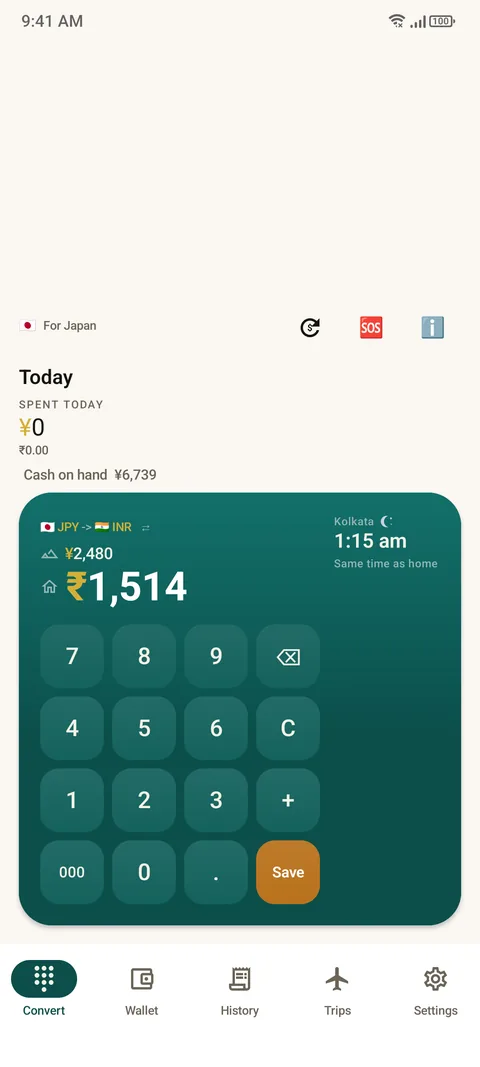
Rate age matters
Exchange rates move. A rate saved this morning is fine for a day's shopping. A rate saved three weeks ago, in a volatile currency, may be a few percent out. That is why the age is always on screen. As a rough guide:
| Rate age | Good for |
|---|---|
| Hours | Everyday prices and budgeting |
| A few days | Everyday prices, with a small margin of error |
| Weeks | A rough idea only. Check when you can |
Rates in Here & Home are indicative, not financial quotes. The final amount on your card statement is the one that counts.
Typing your own rate
If you do not like the saved rate, or you know a better one, for example the rate on a cash exchange board, type in your own. The converter then uses it. This is useful when the rate you actually get differs from the market rate.
Prepare before you fly
- Open the app on Wi-Fi at the airport or hotel so the rates are as fresh as possible.
- Check your home currency and the trip's currency are right.
- Set your card fee, tax and tip once. See card fees explained.
- Look at Help and FYI for your destination, which are bundled in the app. See emergency numbers.
- Download offline maps in a map app, since Here & Home's map needs tiles from OpenStreetMap and offline coverage is an approximation.
What else works offline
The converter, the expense tracker, the dual clock, Help (emergency numbers, phrases, survival kit) and FYI (country guide) all work without a signal. Syncing a shared trip needs a connection. See how to convert from the home screen.
Questions people ask
Can I convert currency without internet?
Yes, with an app that saves rates. Here & Home uses the last saved rates and shows how old they are.
How accurate are saved rates?
Accurate for the day they were saved. They drift as rates move, which is why the age is shown.
Can I use my own exchange rate?
Yes. Type in your own rate and the converter uses it.
What should I do before I travel?
Open the app on Wi-Fi so the rates are fresh, set your card fee, and check Help and FYI for your destination.
Do expenses save offline?
Yes. They are saved on your phone and stay there until you share or export them.
Does the map work offline?
The app's map is built on OpenStreetMap and offline coverage is an approximation. Use a dedicated offline map as well if you rely on one.
Keep reading
Works where you go
Here & Home is free on Google Play. Converts with no signal.

For reference. Steps and screens described here are as they appear in Here & Home, and menu names can differ between versions of Android and the app. Exchange rates and prices in examples are illustrative, and rates in Here & Home are indicative, updated periodically and not financial quotes. Emergency numbers, phrases, country facts and survival tips are general information given on a best-effort basis: check them before you travel, and do not rely on any app alone in a life-threatening emergency. Here & Home is a field companion, not a financial or emergency service. Trademarks are those of their owners and are used only to describe what the app works with.