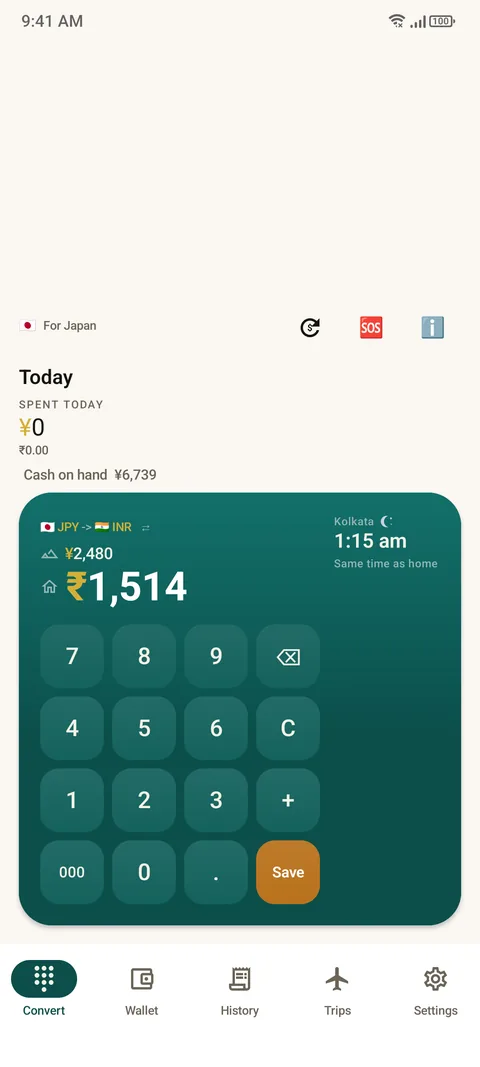
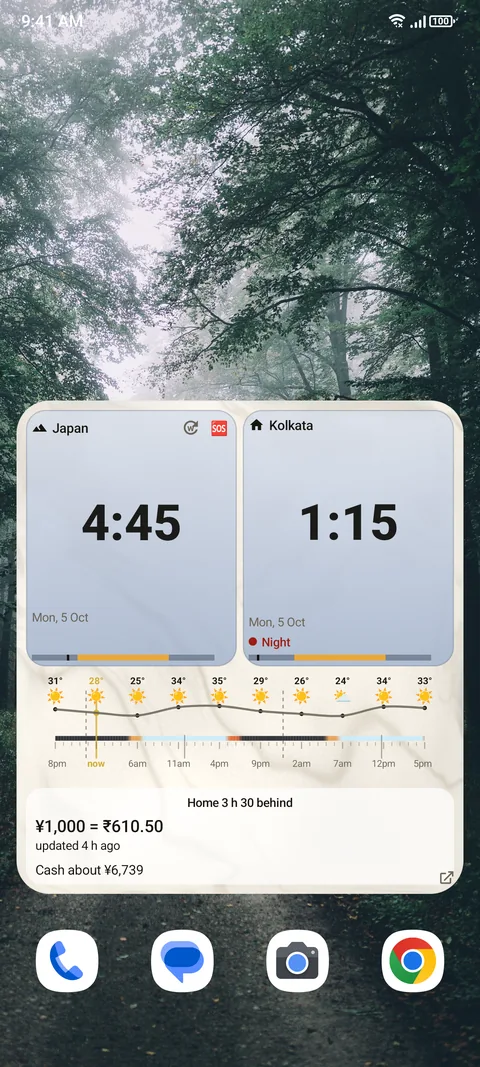
Put the Here & Home widget on your home screen. It shows as a clock. Tap it and a keypad opens: type the price on the tag and read it in your home currency straight away, using the last saved rates, even offline. Example: ¥2,480 is about ₹1,514 at the saved rate. The rate's age and source are always on screen, and card fees are shown apart from the market rate.
The problem with a foreign price tag
You land, and every number means nothing. A coffee is 450, a train ticket is 1,320, a jacket is 12,900. Is that cheap or a rip-off? The usual routes are slow when you are standing in a queue: open a browser, type "450 JPY to INR", wait for a page, find the right box. By the third price you stop checking, and that is when overspending starts.
The three-second flow
- Tap the widget on your home screen. The converter keypad opens.
- Type the price on the tag.
- Read it in your home currency.
When you are not converting, the same widget is a dual clock for where you are and where home is.
Set it up
- Install Here & Home from Google Play (Android 12 or newer).
- Pick your home country during setup. Everything is then calculated in your home currency.
- Finish setup, or tap Add the widget in Settings. It appears on your home screen as a clock.
A keypad made for price tags
- 000 key. A price of ¥65,000 is 6, 5, then 000. Built for currencies with many zeros. See the guide to currencies with many zeros.
- Plus key. Add each item as you shop and see a running basket total in home money.
- Swap instead of decimal. Where a currency has no everyday cents, the decimal key becomes a swap key, so you never type cents that do not exist.
- Save key. Tap Save, pick cash or card and a category, and the price is filed as an expense in today's trip.
The real price, not just the market rate
The number you pay is not the market rate. Cards add a fee, and some places add tax or a tip. Set your card fee, tax and tip once, and the app shows the market rate on top and the real cost underneath, kept apart so the two are never blended. See how card fees and dynamic currency conversion work.

Widget, search or app?
| Home screen widget | Web search | A full app | |
|---|---|---|---|
| Steps | Tap, type, read | Open browser, type query, read | Find app, open, choose currencies, type |
| Works offline | Yes, with the last saved rates | No | Some do |
| Shows rate age | Always | Rarely | Sometimes |
| Adds card fee | Yes, kept apart | No | Some do |
| Saves the expense | One tap | No | Some do |
How far to trust the number
Rates in Here & Home are indicative, updated periodically, and not financial quotes. The age and the source of the rate are always on screen, so you can judge them. If you do not like a rate, type in your own. For an important purchase, your card statement is the final word. See how the converter works with no signal.
Questions people ask
How do I convert a foreign price quickly on Android?
Put the Here & Home widget on your home screen, tap it, type the price on the tag and read it in your home currency. It takes about three seconds.
Does the converter work offline?
Yes. It uses the last saved rates and shows how old they are. You can also type your own rate.
Is the rate a real bank rate?
No. Rates are indicative and not financial quotes. The app shows the age and source of each rate.
Does it include my card fee?
Yes. Set your card fee, tax and tip once, and the real cost is shown beneath the market rate, kept apart.
Do I need an account?
No. There is no sign-up. Your expenses stay on your phone unless you share a trip.
Which Android versions does it support?
Android 12 and newer.
Keep reading
Read every price tag in three seconds
Here & Home is free on Google Play. Android 12 or newer.

For reference. Steps and screens described here are as they appear in Here & Home, and menu names can differ between versions of Android and the app. Exchange rates and prices in examples are illustrative, and rates in Here & Home are indicative, updated periodically and not financial quotes. Emergency numbers, phrases, country facts and survival tips are general information given on a best-effort basis: check them before you travel, and do not rely on any app alone in a life-threatening emergency. Here & Home is a field companion, not a financial or emergency service. Trademarks are those of their owners and are used only to describe what the app works with.