Record every expense as it happens, with who paid and who shares it. At the end, work out each person's net balance: what they paid minus their share. People with a negative balance pay people with a positive one. With four friends and 220 of shared costs, three payments settle everything. In Here & Home, expenses go in a shared trip, you mark each one shared or private, and Settle up gives the fewest payments.
Why group trips get awkward
One person books the hotel, another pays for dinner, a third buys taxi rides, and everyone covers a different drink. Without a record, the end of the trip becomes a memory test, a mess of screenshots, and a conversation nobody wants. A fair split needs two things: a complete list of expenses saved on the day, and a simple method for settling up.
The net balance method
- List every shared expense with who paid and who shares it.
- Work out each person's share of each expense. For an equal split, divide by the number of people sharing it.
- Net balance for each person = total they paid minus their total share.
- Positive balance: they are owed money. Negative balance: they owe money.
- Match the people who owe with the people who are owed, until every balance is zero.
The number of payments never needs to be more than the number of people minus one. Netting first, instead of everyone paying each other back for each expense, is what keeps it short.
Worked example, four friends
Anna, Ben, Chloe and Dev share three costs equally: the hotel, a dinner and a taxi.
| Expense | Paid by | Amount | Each person's share |
|---|---|---|---|
| Hotel | Anna | 120 | 30 |
| Dinner | Ben | 60 | 15 |
| Taxi | Chloe | 40 | 10 |
| Total | 220 | 55 |
| Person | Paid | Share | Net balance |
|---|---|---|---|
| Anna | 120 | 55 | +65 (is owed) |
| Ben | 60 | 55 | +5 (is owed) |
| Chloe | 40 | 55 | −15 (owes) |
| Dev | 0 | 55 | −55 (owes) |
Settle up: Dev pays Anna 55. Chloe pays Anna 10 and Ben 5. That is three payments, and every balance is now zero. If everyone had paid each other back for each expense separately, it would have taken far more transfers.
Private items stay private
Not everything is shared. A souvenir for your mother, a spa visit or a drink only you had should not be in the split. Mark private items as private, and they are kept out of everyone else's balances. Items shared by only some people should list only those people.
Doing it in Here & Home
- Start a group trip in the Trips tab and invite your friends with a code. Group tools live in Advanced mode, which you switch on in Settings.
- Save expenses as you spend. Convert, tap Save, pick the category and cash or card.
- Choose who shares each entry: just me, everyone or specific members.
- Settle up. The app shows who owes whom, and the fewest payments to square it. The owner marks it Settled.
- Export one PDF so everyone has the same numbers.
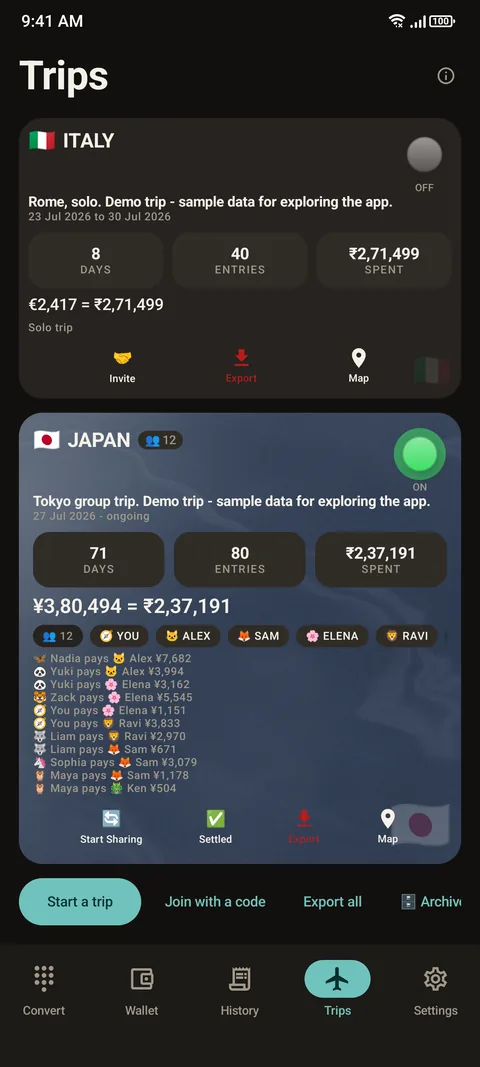
Balances update from each member's point of view, so everyone sees what they owe or are owed. Anything saved on one phone is shared only for the entries marked as shared. See how to export a trip.
Rules that avoid arguments
- Agree before the trip how you will split: equally, by room, or by what each person uses.
- Record each expense when it happens, with who shares it.
- Use one currency for the settle-up, usually your home currency.
- Decide how to handle card fees and exchange-rate differences. Keep it simple and consistent.
- Settle once, at the end, and mark it settled.
Questions people ask
How do I split trip expenses fairly?
Record every expense with who paid and who shares it, work out each person's net balance, and let those who owe pay those who are owed.
What is the fewest payments method?
Net everyone's balance first, then match those who owe with those who are owed. The number of payments is at most one less than the number of people.
Can I keep some expenses private in a group trip?
Yes. Mark them as private and they stay out of everyone else's balances.
Does everyone need the app?
Members join with an invite code. Everyone then sees the shared entries and the balances from their own point of view.
Can I get a record to share?
Yes. You can export one PDF so everyone has the same numbers.
Where are the group tools?
In Advanced mode, which you switch on in Settings. Simple mode is for solo trips.
Keep reading
Travel together, split fairly
Here & Home is free on Google Play. Shared trips with a fair settle-up.

For reference. Steps and screens described here are as they appear in Here & Home, and menu names can differ between versions of Android and the app. Exchange rates and prices in examples are illustrative, and rates in Here & Home are indicative, updated periodically and not financial quotes. Emergency numbers, phrases, country facts and survival tips are general information given on a best-effort basis: check them before you travel, and do not rely on any app alone in a life-threatening emergency. Here & Home is a field companion, not a financial or emergency service. Trademarks are those of their owners and are used only to describe what the app works with.