Never Away is a free Android app by Trishunya Infotech, built by a solo developer. It makes your phone a real Bluetooth keyboard and mouse for a Windows PC, and adds macros, shortcut buttons, a presenter remote, a volume dial, a game pad and a number pad with calculator. Nothing is installed on the PC, there is no account, and it works without internet.
Why it exists
Thinking is work, but a PC only counts typing and mouse movement. Hand calculations, drawing reviews, reading and brainstorming leave the screen idle, the screen locks, and the chat status flips to Away. A keyboard dies mid-job. The same ten commands are buried under menus. Never Away was built for those moments: the phone already in your hand becomes a real Bluetooth keyboard and mouse, and does more.
The eight jobs
- Keyboard. Type anywhere on the PC.
- Trackpad. Move, click, scroll, with two-finger scrolling.
- Macros. Record once, replay with one tap.
- Shortcut pad. One-tap buttons for programs, links and key combinations.
- Presenter remote. Slides, laser and pen.
- Volume dial. A real-feeling knob with mute and playback.
- Game pad. Sticks, buttons and triggers.
- Num pad. A number pad, with a calculator that works on its own.
And it stays out of the way: your PC can stay awake while you think. See the app tour for each part, or start with how to pair it.
How it stays free
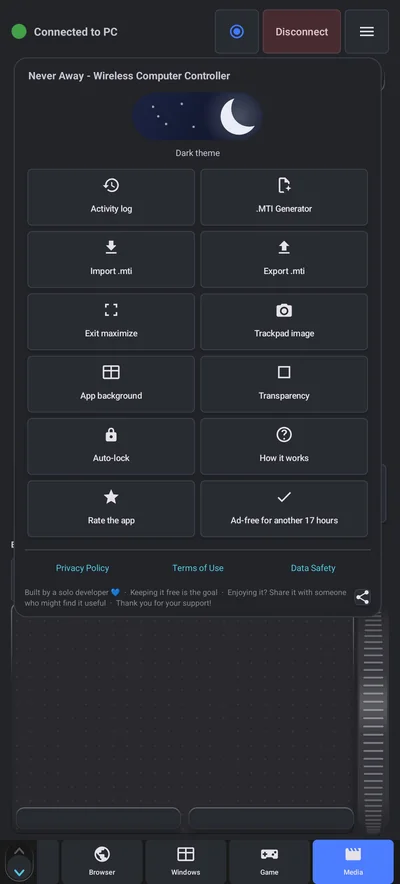
It is built by a solo developer, and the goal is to keep it free. Ads pay for it. Watching one short video buys a day without ads, and the menu shows how long the ad-free time has left. There is no account to create and no plan to choose. If you enjoy it, rating it and sharing it with someone who might find it useful helps most.
What data it uses
Macros, shortcuts, tags and preferences live on your phone. Your keystrokes, macros and files are never sent to the developer. The app uses Google Analytics for aggregate usage, Google AdMob for ads, and the Meta SDK to measure installs from the developer's own ad campaigns. The Privacy Policy and Data Safety pages on this site give the details. The phone only sends input to the PC, so it cannot see your screen or files. See whether a phone keyboard app is safe.
Where it stops
- It needs Android 12 or newer, and it is for Windows PCs. It is not for Mac, Linux or iPhone.
- Both devices need Bluetooth, and the phone must stay in range.
- Bluetooth input does not work before Windows starts, such as in BIOS setup.
- It sends input. It does not show you the PC screen.
- Macros replay what you recorded, so they depend on the same screen layout and timing. Test them.
Feedback
Suggestions are welcome by email, and the app's menu has a How it works page and links to the privacy pages. Never Away is made by Trishunya Infotech.
Questions people ask
Who makes Never Away?
Trishunya Infotech, a solo Android app studio.
Is Never Away free?
Yes. It is supported by ads, and one short video buys a day without ads.
Does it need an account?
No. There is no sign-up, name or email.
Does it work on a Mac or iPhone?
No. It is an Android app made for Windows PCs.
What does it do besides typing?
It has a trackpad, macros, shortcut buttons, a presenter remote, a volume dial, a game pad and a number pad with a calculator.
Where do my macros live?
On your phone. You can export them as a .mti file to back them up or share them.
Keep reading
Try it on your phone
Never Away is free on Google Play. No account, nothing to install on your PC.

For reference. Steps and screens described here are as they appear in Never Away and in Windows at the time of writing, and menu names can differ between versions of Windows, Android and other software, so test any setup before you depend on it. Never Away is an independent app by Trishunya Infotech. Windows, Microsoft Teams, PowerPoint, Excel, AutoCAD and Bluetooth are trademarks of their respective owners and are named only to describe what the app works with. Follow your employer's IT and security policies when you use any tool on a work computer.