A keyboard connection is one-way in what matters: the phone sends keystrokes and mouse movements, and Windows does not send your screen, files or apps back over it. Never Away works that way, needs no software on the PC and has no account. The real risks are practical: pairing with the wrong device, recording passwords in macros, and importing macro files from people you do not trust.
How a Bluetooth keyboard connection works
A Bluetooth keyboard or mouse uses the HID profile, short for human interface device. The device sends small reports: this key went down, the pointer moved this far. Windows reads them and acts. There is no channel in that arrangement for Windows to stream its screen, its files or its programs to the keyboard.
Think of a plain USB keyboard. It can type into your PC, but it cannot look at your PC. Never Away presents the phone in the same role.
What a keyboard cannot see
- The PC's screen.
- Your files and folders.
- Which programs are open.
- What other people type on the PC's own keyboard.
That is why Never Away is not a remote desktop. You watch the PC on its own monitor, and the phone only sends input.
What it can do
A keyboard can send keystrokes and clicks, so it has the power of whoever is typing. That is the point, and it is also the thing to respect. Anything you or a macro can do from a keyboard, the phone can do: open programs, type text, press Enter on a dialog. So the sensible questions are about who controls the phone and what the macros contain.
What Never Away says it does
- Nothing on the PC. No program, driver or helper to install.
- No account. No sign-up, no name, no email.
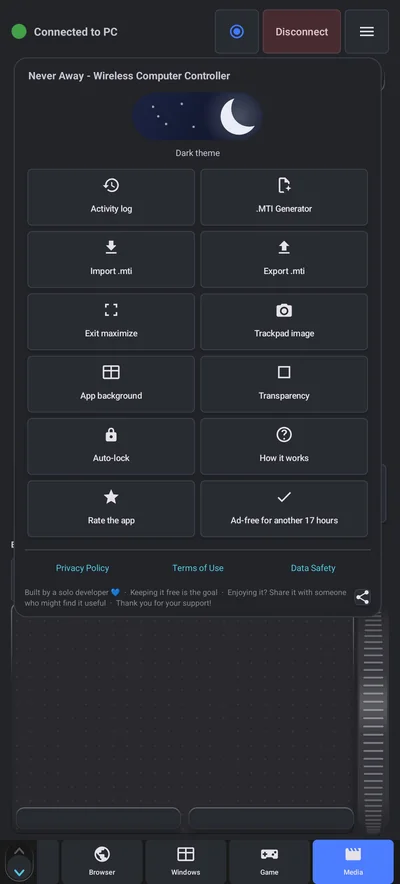
- Data stays on the phone. Macros, shortcuts, tags and preferences live on the device. Your keystrokes, macros and files are never sent to the developer.
- Works without internet. Bluetooth, typing, macros and shortcuts do not need a connection.
- Free, supported by ads. Ads need a connection to load, and one short video buys a day without them.
- Analytics and ads. The app uses Google Analytics for aggregate usage, Google AdMob for ads, and the Meta SDK to measure installs from the developer's own ad campaigns. The Privacy Policy and Data Safety pages on this site give the details.
The real risks
- Pairing with the wrong thing. Only accept a pairing request you started, on a device you recognise.
- A phone left unlocked. If someone picks up an unlocked phone that is connected to your PC, they can type on it. Use the phone's screen lock and the app's Auto-lock.
- Passwords in macros. A macro stores the keys you pressed. If you record a password it sits in the macro in plain form.
- Macro files from strangers. A .mti file contains macros and shortcuts that send keystrokes to your PC. Only import files from people you trust, and read what a macro does before you play it.
- Shared PCs. Do not enter passwords or private text on a PC you do not own.
Seven sensible rules
- Pair only from the app, and only with your own PC.
- Remove the pairing from Windows when you no longer use it.
- Lock your phone, and use Auto-lock in the app.
- Never record a macro that types a password.
- Import macro files only from people you trust.
- Follow your employer's IT policy on a work computer.
- Read the Privacy Policy and Data Safety page before you install any app, including this one.
For setup, see how to pair. For macro files, see the guide to .mti files.
Questions people ask
Can a phone Bluetooth keyboard app spy on my PC?
A keyboard connection sends keystrokes and pointer movements to the PC. Windows does not send its screen or files back over it. Never Away is designed as an input device and has no way to see your screen or files.
Do I have to install anything on my PC?
No. Windows already supports Bluetooth keyboards, so nothing is installed on the PC.
Does Never Away need an account?
No. There is no sign-up, name or email. It works without internet.
What data does the app collect?
It uses Google Analytics for aggregate usage, Google AdMob for ads and the Meta SDK to measure installs from the developer's own campaigns. Your keystrokes, macros and files are not sent to the developer. See the Privacy Policy and Data Safety page.
Is it safe to record macros?
Yes, if you do not record passwords or private text, and you only import macro files from people you trust.
What should I do if I lose my phone?
Remove the phone from Windows Bluetooth devices, and lock or wipe the phone using Android's find and lock tools.
Keep reading
Read the privacy page, then try it
Never Away is free on Google Play. Nothing to install on your PC, no account to create.

For reference. Steps and screens described here are as they appear in Never Away and in Windows at the time of writing, and menu names can differ between versions of Windows, Android and other software, so test any setup before you depend on it. Never Away is an independent app by Trishunya Infotech. Windows, Microsoft Teams, PowerPoint, Excel, AutoCAD and Bluetooth are trademarks of their respective owners and are named only to describe what the app works with. Follow your employer's IT and security policies when you use any tool on a work computer.