A .mti file is a single file that holds your Never Away macros, shortcuts, tags and pages. In the app menu choose Export .mti to save one, send it like any file, and the other person chooses Import .mti. The app has 35 built-in presets, and the online MTI Generator lets you design a layout in the browser and download it as a .mti file.
What it holds
MTI is the file format Never Away uses to move your setup around. A single .mti file can hold:
- Macros, with their steps, names and icons.
- Shortcuts, the one-tap buttons, including key combinations, links, programs and macro buttons.
- Tags and pages, so your layout comes back organised, for example a page for Excel and one for AutoCAD.
- Icons used on the buttons.
Under the surface it is a small compressed file with a text file inside that describes the layout. You never need to open it by hand.
Export and import
- Open the menu in Never Away.
- Choose Export .mti to save your macros and shortcuts as a file. Choose a name and where to save it.
- Send the file the way you would send any file: email, a chat app, a cloud drive.
- On the other phone, open the menu and choose Import .mti, then pick the file.
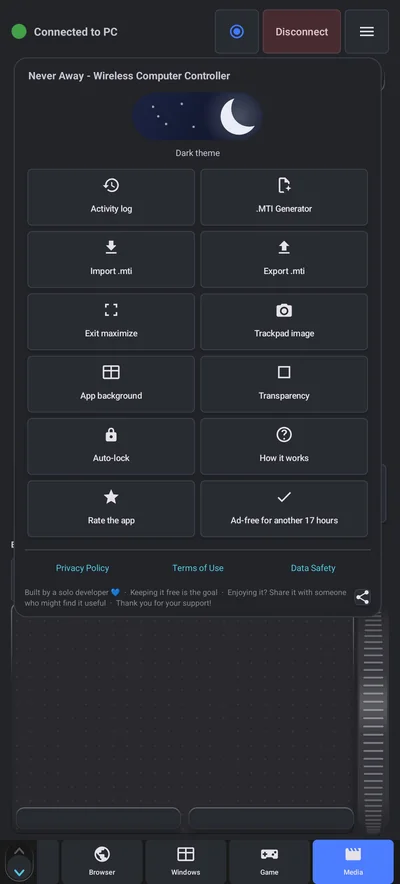
You can also export a single macro. Long-press it in the Macros tab and choose export. Import is one tap, and the layout is ready to play.
Start from a preset
You do not have to build from nothing. The app comes with 35 ready-made presets, including sets for common programs. Load one, then change names, icons and buttons to suit your work. It is quicker to adjust a layout than to design one from scratch.
Design a layout in the MTI Generator
Building many buttons on a phone screen is fiddly. The MTI Generator is a web page where you design a whole layout on a computer. It works in four steps:
- Pack and pages. Name the pack and set up the pages.
- Shortcuts. Add and arrange the buttons.
- Macros. Add macros.
- File. Download the .mti file, or copy its text.
You can also open an existing .mti file in the generator and edit it. Then copy the file to your phone and import it from the menu.
Where it helps
- A team with the same routine. One person builds the set for a program, everyone imports it.
- A new phone. Export before you switch, import after.
- Backups. A copy of your layout in your cloud drive means a lost phone does not lose the setup.
- Program sets. A page of Excel commands, a page of AutoCAD commands, a page for presenting. See the macro pad guide.
Only import files you trust
A macro sends keystrokes to your PC, and a .mti file can contain many of them. A careless macro could close windows, open pages or type text where you do not want it. Import files only from people you trust, and check what a macro does before you play it, ideally on a PC with nothing open. See whether a phone keyboard app is safe for the wider picture.
Questions people ask
What is a .mti file?
It is the file format Never Away uses to export and import macros, shortcuts, tags and pages as one file.
How do I share my macros with someone else?
In the menu choose Export .mti, send the file, and they choose Import .mti on their phone.
Can I edit a .mti file on a computer?
Yes. The online MTI Generator opens a .mti file, lets you change the layout, and downloads a new file.
Are there ready-made layouts?
Yes. The app includes 35 built-in presets.
Is it safe to import a .mti file from someone?
Only if you trust them. The file can contain macros that send keystrokes to your PC.
Do I need an account to share layouts?
No. A .mti file is a normal file you send yourself. The app has no account.
Keep reading
Build it once, share it
Never Away is free on Google Play. Export, import and presets, with no account.

For reference. Steps and screens described here are as they appear in Never Away and in Windows at the time of writing, and menu names can differ between versions of Windows, Android and other software, so test any setup before you depend on it. Never Away is an independent app by Trishunya Infotech. Windows, Microsoft Teams, PowerPoint, Excel, AutoCAD and Bluetooth are trademarks of their respective owners and are named only to describe what the app works with. Follow your employer's IT and security policies when you use any tool on a work computer.