Pair the phone with the PC using Never Away and open the Media tab. A large dial changes the volume, the centre button is Mute, and below it are Previous, Play or Pause, Stop and Next. It controls the PC over Bluetooth, so it works from across the room and needs nothing installed on the PC.
Why a phone dial
Laptop volume keys are small, and a PC on a desk speaker or a TV has no volume knob at all. A physical knob feels good and is easy to find without looking. A phone dial gives you that feeling without more hardware, and you can use it from the sofa.
Using the Media tab
Open the Media tab in Never Away. You will see a large dial with Mute in the middle. Turn it with your thumb to change the volume. Under it are the playback buttons: Previous, Play / Pause, Stop and Next.
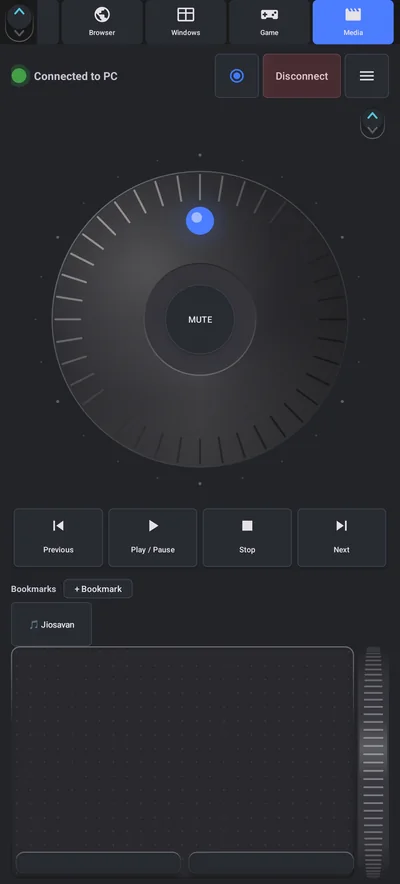
These control the PC the way the media keys on a keyboard do. Whatever is playing and listens to those keys, such as a music player or a browser tab with a video, responds.
Bookmarks
The Media tab also has a Bookmarks row. Tap + Bookmark to save a link to a site or service you play from often, and open it with one tap.
Browser and video shortcuts
The Browser tab adds tabs, back, refresh, zoom and find. For YouTube in a browser, these standard keys are handy to put on a Shortcuts button:
| Key | What it does |
|---|---|
| K | Play or pause |
| J, L | Back or forward 10 seconds |
| F | Full screen |
| M | Mute |
| C | Captions |
| Shift + N, Shift + P | Next, previous video |
Tips
- Windows has two volumes. The dial changes the PC's system volume, while a program can have its own level in the Windows volume mixer. If you hear nothing at high volume, check the program's slider.
- Sit within range. Bluetooth works up to about 10 metres (33 ft) in open space.
- Keep the phone awake. Use the app's Auto-lock and a longer screen timeout so the phone does not go dark mid-film.
- Pair first. See how to pair.
What it controls
Never Away controls a Windows PC. It does not control a smart TV, a speaker or a streaming stick. For the whole living room setup, including the trackpad and keyboard, see controlling a PC on a TV from the sofa.
Questions people ask
Can I control my PC volume from my phone?
Yes. With Never Away, the Media tab has a volume dial, a mute button and playback buttons that control the PC over Bluetooth.
Does it work with Spotify, YouTube and VLC?
The buttons act like the media keys on a keyboard, so programs that respond to those keys react. Test with your player.
Do I need to install anything on the PC?
No. Windows accepts Bluetooth keyboards and media keys without extra software.
Can I use it from another room?
Only within Bluetooth range, about 10 metres (33 ft) in open space, and less through walls.
Can it control a smart TV or speaker?
No. It controls a Windows PC.
Why can I not hear anything when the volume is up?
The program may have its own level in the Windows volume mixer, or the wrong output device may be selected. Check the mixer.
Keep reading
A volume knob in your pocket
Never Away is free on Google Play. Volume dial, mute and playback for your PC.

For reference. Steps and screens described here are as they appear in Never Away and in Windows at the time of writing, and menu names can differ between versions of Windows, Android and other software, so test any setup before you depend on it. Never Away is an independent app by Trishunya Infotech. Windows, Microsoft Teams, PowerPoint, Excel, AutoCAD and Bluetooth are trademarks of their respective owners and are named only to describe what the app works with. Follow your employer's IT and security policies when you use any tool on a work computer.