Save each client file the day it arrives: open it, tap Share, pick SaveLocal. Keep the original file name, use one folder per client, and check Recent Saves at the end of the week. Then copy the folder to a computer or a cloud drive, because SaveLocal saves a copy on your phone and is not a backup service.
Why work files go missing
For many small businesses and freelancers, WhatsApp is the real inbox. A client sends a PDF quote at 9 pm, a supplier sends a photo of a delivery note, a colleague sends a spreadsheet. Weeks later a customer asks for it, and the file is somewhere in a chat, if it is still on the phone at all. A job that depends on a file can stall while you scroll.
A five-step routine
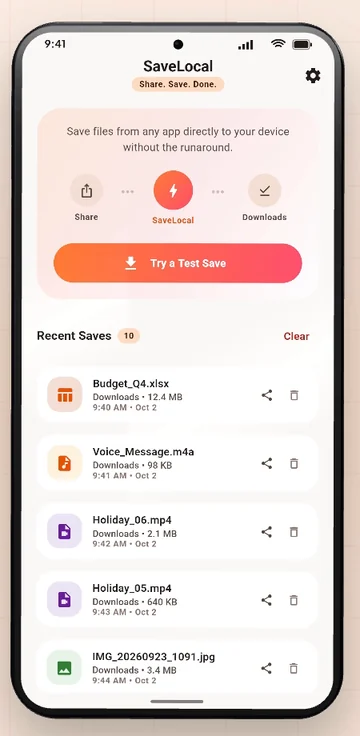
- Save on arrival. Open the file, tap Share, pick SaveLocal. It goes to Downloads, or your chosen folder, with its original name.
- Batch at the end of the day. If several files came in, select them all in the chat and share once. The card counts them as they save.
- Check Recent Saves. Open SaveLocal and confirm that each file is listed.
- Sort once a week. Move files from Downloads into client folders.
- Back up. Copy the folder to a computer or a cloud drive.
One folder per client
Create a folder in the Files app for each client, or a single Clients folder with a subfolder for each. In SaveLocal Settings you can pick a save folder, which is handy while you work for one client for a while. See how to change the save folder. Otherwise let files land in Downloads and move them on Fridays.
| Folder | What goes in it |
|---|---|
| Clients / Acme | Quotes, invoices, drawings and approvals for Acme |
| Clients / Brown Ltd | The same, for Brown Ltd |
| Suppliers | Delivery notes and price lists |
| Papers | Tax, insurance and bank documents |
Names and versions
SaveLocal keeps the name the file arrived with, and never overwrites. If the same name arrives again, the new file becomes quote (1).pdf, so earlier versions are not lost. See how copies are numbered. Once you know which version is final, rename it with a date, such as quote_approved_2026-10-14.pdf.
Back it up
A copy on the phone is lost if the phone is. SaveLocal copies a file to your phone, and it does not upload, sync or back up. Copy your client folders to a computer or a cloud drive regularly. A calendar reminder once a week is enough.
Rights and records
You are responsible for having the right to keep the files you save, and for keeping records as the rules where you work require. Files that contain personal or confidential information deserve care: lock your phone and be careful where you copy them. This is general information, not legal or tax advice.
Questions people ask
How do I save an invoice from WhatsApp?
Open the invoice, tap Share and pick SaveLocal. It is copied to Downloads with its original name.
How can I organise client files from WhatsApp?
Save them as they arrive, move them into one folder per client once a week, and back the folders up.
Will the original file name be kept?
Yes. If the same name already exists, the new copy gets a number in brackets.
Is SaveLocal a backup?
No. It saves a copy on your phone. Copy the files to a computer or a cloud drive for a backup.
Can I save several invoices at once?
Yes. Select them all, tap Share once and pick SaveLocal.
Does it need an account?
No. It has no account and no ads.
Keep reading
Make WhatsApp work files findable
SaveLocal is free on Google Play. Two taps, one folder.

For reference. Steps and screens described here are as they appear in SaveLocal, and menu names and folder paths can differ between phone makers and versions of Android and WhatsApp, so check them on your own phone. SaveLocal saves what another app shares with it, so the result depends on what that app allows. It is not a file manager and not a backup service, so keep separate copies of anything important. You are responsible for having the right to keep the files you save. WhatsApp, Telegram, Gmail, Chrome and other app names are trademarks of their owners and are used only to describe what SaveLocal works with.