SaveLocal never overwrites a file. If a file with the same name is already there, the new copy gets a number in brackets, such as report (1).pdf, then report (2).pdf. Original names are kept, including spaces, accents, emoji and other languages. Only characters that a file system cannot store are swapped for safe ones.
Why names collide
People are not careful with file names. A client sends invoice.pdf in March and invoice.pdf again in April. A scanner app names every file scan.pdf. A colleague sends Report_final.pdf and later Report_final.pdf with changes. If you save them all into one folder, the names are the same, and what happens next depends on the app.
What can go wrong
Some apps replace the older file with the newer one without asking. If you wanted both, the first is gone. This is especially painful when the older version was the one you needed, for example an approved quote replaced by a revised one.
How copies are numbered
SaveLocal does not replace anything. When a file of the same name already exists in the save folder, it saves the new one with a number in brackets before the extension:
| Save | File name in Downloads |
|---|---|
| First | report.pdf |
| Second | report (1).pdf |
| Third | report (2).pdf |
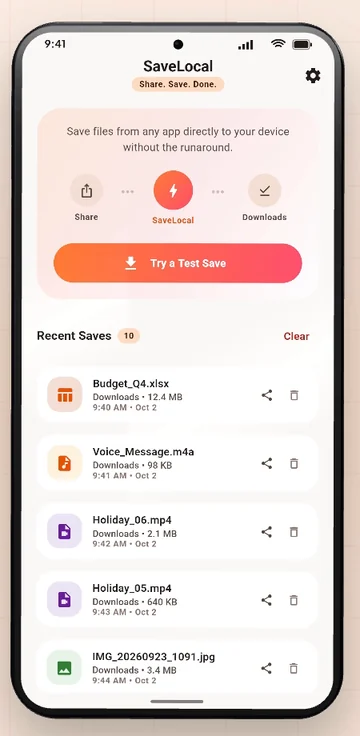
Each copy is complete and independent. Open Recent Saves to see them listed with type, name, size and time, newest first. Deleting from the list only clears the list entry, never the file itself.
Original names kept
SaveLocal keeps the name the file arrived with. Spaces, accents, emoji and other languages are all kept. The only change is to characters that a file system cannot store at all, which are swapped for safe ones. That means a name such as a CV in another script stays readable and searchable.
Habits that keep a folder clean
- Check the time in Recent Saves when you want to know which copy is newest.
- Rename the copy you keep. Add a date or a version in your file manager once you know which one is right, for example
quote_approved_2026-10-14.pdf. - Delete only after checking. Open both copies if you are unsure.
- Use a folder per project. A custom save folder keeps one client's files apart. See how to change the save folder.
- Save when it arrives. A file saved on the day does not get lost in the pile. See saving WhatsApp files.
Questions people ask
Does SaveLocal overwrite files with the same name?
No. It saves the new file with a number in brackets, for example report (1).pdf, and leaves the old one untouched.
Does it keep the original file name?
Yes, including spaces, accents, emoji and other languages. Only characters a file system cannot store are swapped.
How do I tell which copy is newest?
Open Recent Saves in the app, which lists files with their time, newest first.
What does the bin in Recent Saves delete?
Only the list entry. It never deletes the file itself.
Can I rename a file after saving?
Yes, in your file manager or the app that opens it.
What if I want to replace the old file?
Delete the old one in your file manager, or save the new one and rename it.
Keep reading
Keep every version
SaveLocal is free on Google Play. It never overwrites a file.

For reference. Steps and screens described here are as they appear in SaveLocal, and menu names and folder paths can differ between phone makers and versions of Android and WhatsApp, so check them on your own phone. SaveLocal saves what another app shares with it, so the result depends on what that app allows. It is not a file manager and not a backup service, so keep separate copies of anything important. You are responsible for having the right to keep the files you save. WhatsApp, Telegram, Gmail, Chrome and other app names are trademarks of their owners and are used only to describe what SaveLocal works with.