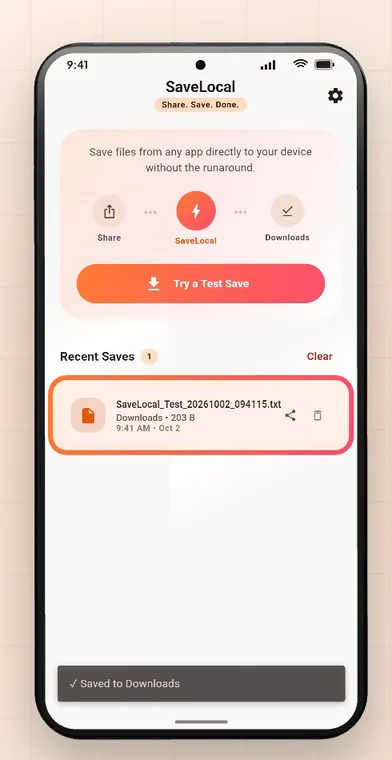
Create the folder in your Files app first, then open SaveLocal, tap the gear to open Settings, and choose that folder as the save location. Files go to Downloads by default. Chrome has its own download location setting. Android stops apps from being given some system folders, so pick a normal folder you created.
Why change it
Downloads is a good default until it holds 600 files with names like IMG_2026.... A folder per client, per trip or per course makes things much easier to find, and easier to copy or back up as a set.
Make a folder first
- Open the Files app.
- Go to Internal storage (or your SD card if you have one).
- Tap the menu and choose New folder. Give it a clear name, such as
ClientsorInvoices 2026.
Set it in SaveLocal
- Open SaveLocal and tap the gear to open Settings.
- Choose the save folder option and pick the folder you made. You only do this once.
- From then on, files you save with SaveLocal go there. Switch back to Downloads any time.
Settings also has a dark theme, and an option to turn on prompts if you prefer to be asked each time. Tap Try a Test Save afterwards to check the file lands where you expect.
Chrome and other apps
Other apps have their own settings. In Chrome on Android, open the menu, then Settings, then Downloads, and you can choose the download location and turn on Ask where to save files. WhatsApp itself does not let you choose where received files go, which is why saving them with the share sheet is useful. See how to save WhatsApp files.
What Android will not allow
- Newer Android versions do not let an app be given certain system folders as a save location, such as the top level of Downloads or the Android data folders. Choose a folder you created inside internal storage.
- A folder on a removable SD card can be chosen, but if you take the card out, the folder is gone.
- If you delete the folder later, pick a new one in Settings.
Folder ideas
| If you work with | Try a folder for |
|---|---|
| Clients | One folder per client, or one Clients folder with a subfolder each |
| School or courses | One folder per subject |
| Family | Trips, events and years |
| Bills and papers | Invoices, Tickets, Tax, Medical |
You can move files between folders in the Files app whenever you like. Keep a second copy of anything important, because SaveLocal is not a backup service.
Questions people ask
How do I change where files are saved on Android?
Android has no single setting. Each app chooses. In SaveLocal, open Settings and pick a folder. In Chrome, use Settings, Downloads.
Where does SaveLocal save files by default?
To your Downloads folder.
Can I choose an SD card folder?
Usually yes, a folder you created on the card. If the card is removed, the folder is unavailable.
Why can I not pick the Downloads folder as a custom folder?
Newer Android versions restrict apps from being given certain system folders. Downloads is already the default, so you do not need to pick it.
Do I need to choose a folder every time?
No. You choose once in Settings. You can also turn on prompts if you prefer to be asked each time.
Does changing the folder move my old files?
No. Files already saved stay where they are. New saves go to the new folder.
Keep reading
Your files, your folder
SaveLocal is free on Google Play. Pick a folder once in Settings.

For reference. Steps and screens described here are as they appear in SaveLocal, and menu names and folder paths can differ between phone makers and versions of Android and WhatsApp, so check them on your own phone. SaveLocal saves what another app shares with it, so the result depends on what that app allows. It is not a file manager and not a backup service, so keep separate copies of anything important. You are responsible for having the right to keep the files you save. WhatsApp, Telegram, Gmail, Chrome and other app names are trademarks of their owners and are used only to describe what SaveLocal works with.