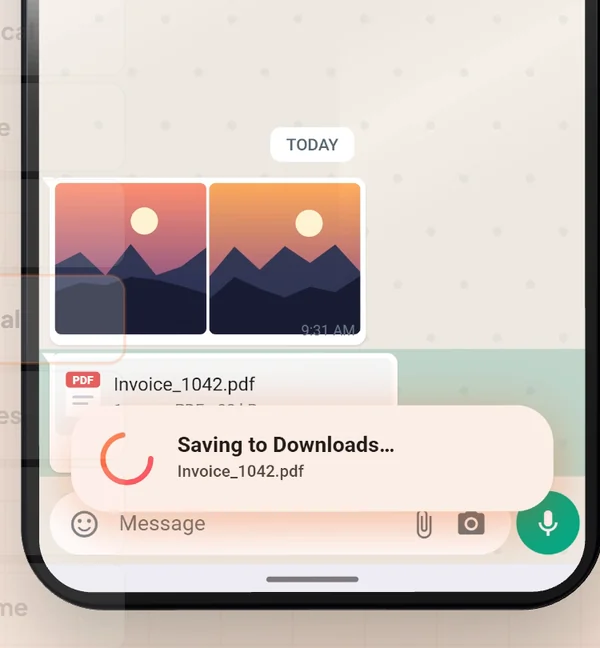
Open the file in WhatsApp and tap Share. In the Android share sheet pick SaveLocal. The file is copied to your Downloads folder with its original name, a card says Saved to Downloads, and you are back in the chat. It works the same for one file or a batch, and for PDFs, photos, videos and audio.
Why WhatsApp files get lost
WhatsApp keeps the files you receive inside its own media folders, mixed with every other image, voice note and document from every chat. You open a PDF in the chat and read it, and it feels saved. Later you look for it in Downloads and it is not there. The file is in WhatsApp's folder, buried several levels down, or it was never downloaded to the phone at all.
What you want is the file in a normal place, with its normal name, the moment it arrives. Android's share sheet is the way in: every app that can share a file puts it there. SaveLocal adds the missing Save option to that sheet.
Save a file in two taps
- Install SaveLocal and open it once. Tap Try a Test Save. A small test file lands in Downloads, so you know it works.
- Open the file in WhatsApp and tap Share.
- Pick SaveLocal from the share sheet.
A small card shows the file saving, then turns into a check that says Saved to Downloads, and you are returned to your chat. There is no folder picker, no filename box and no sign-in.
Save many files at once
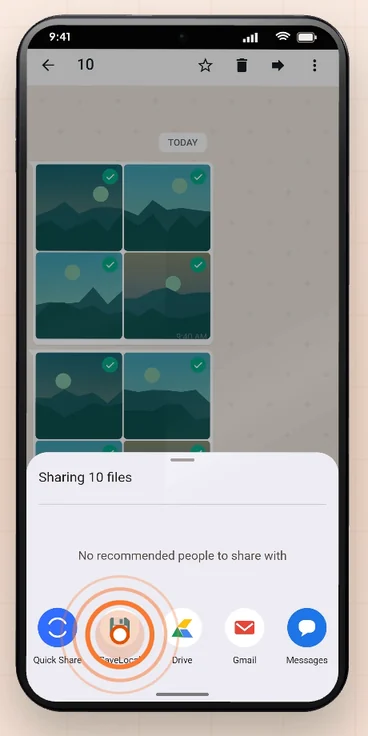
If WhatsApp lets you select several files, pick them all first, tap Share once and choose SaveLocal. The card counts them as it goes, for example saving four of ten, and the last message tells you how many were saved. If one file fails, the others still save and you get an honest count. The guide to saving many photos at once has the steps.
Other ways, compared
| Method | Steps | Good for | Watch out for |
|---|---|---|---|
| SaveLocal from the share sheet | Share, pick SaveLocal | Any file, one or many, with the original name | Needs the app installed |
| Open in a viewer, then save | Open the file, use that app's save or download option | A single PDF you are already reading | Different in every viewer, one file at a time |
| WhatsApp Web on a computer | Open the chat in a browser and download | When you are at a computer anyway | Needs the computer, and the file lands there, not on the phone |
| Find it in WhatsApp's own folder | Browse to the WhatsApp media folder in a file manager | Recovering files you already have | Deeply nested and not always easy to open on newer Android |
Photos and videos are a separate case. WhatsApp can show them in your gallery, and you control that with its Media visibility setting. Documents do not appear in the gallery, which is why PDFs go missing most often.
Check that it saved
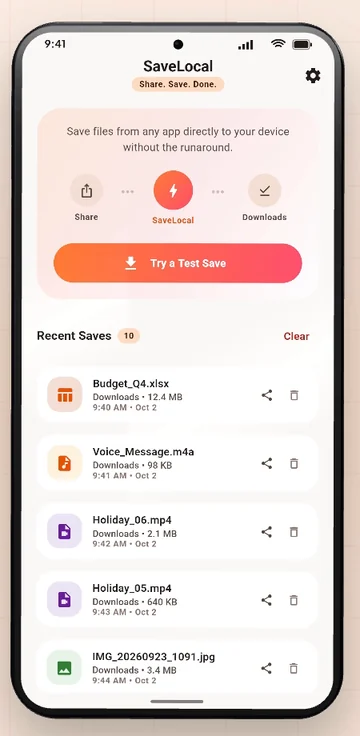
Open SaveLocal. Recent Saves lists every file you saved, with its type, name, size and time. Tap one to open it, or use the share icon to send it on. You can also open your Files app and look in Downloads. See where the Downloads folder is if you are not sure.
If something does not work
- SaveLocal is not in the share sheet. Scroll the row of apps, or tap More. Some phones let you pin favourites to the front.
- The file has not downloaded yet. If the chat shows a download arrow, tap it first so the file is on your phone, then share it.
- Some apps limit what they share. SaveLocal saves what another app shares with it, so the result depends on what that app allows.
- You want it somewhere other than Downloads. Pick a folder once in Settings. See changing the save folder.
Questions people ask
How do I save a WhatsApp PDF to my phone?
Open the PDF in WhatsApp, tap Share and pick SaveLocal. It is copied to your Downloads folder with its original name.
Where does SaveLocal save files?
To your Downloads folder by default. You can choose a different folder in Settings.
Does it work with photos and videos?
Yes. It saves any file an app shares: photos, PDFs, videos, audio, office documents and ZIPs.
Do I need to create an account?
No. There is no account, and the app has no ads.
Does it keep the original file name?
Yes. Spaces, accents and other languages are kept. Only characters that a file system cannot store are swapped.
What if I save the same file twice?
The second copy gets a number in brackets. SaveLocal never overwrites a file.
Keep reading
Save it the moment it arrives
SaveLocal is free on Google Play. Share, Save, Done.

For reference. Steps and screens described here are as they appear in SaveLocal, and menu names and folder paths can differ between phone makers and versions of Android and WhatsApp, so check them on your own phone. SaveLocal saves what another app shares with it, so the result depends on what that app allows. It is not a file manager and not a backup service, so keep separate copies of anything important. You are responsible for having the right to keep the files you save. WhatsApp, Telegram, Gmail, Chrome and other app names are trademarks of their owners and are used only to describe what SaveLocal works with.