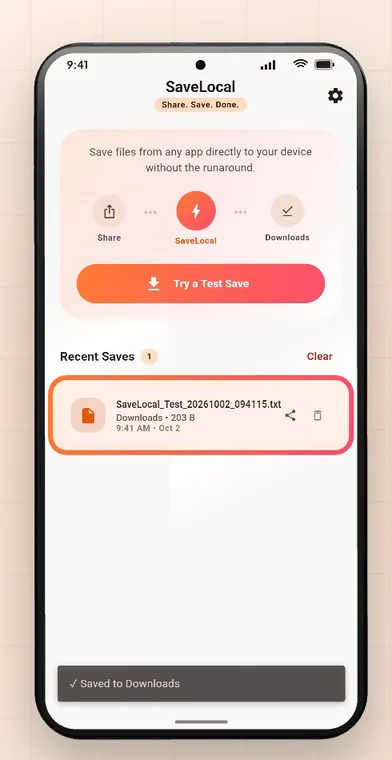
Install SaveLocal, open it once and tap Try a Test Save. Then in any app, open a file, tap Share and pick SaveLocal. A card says Saved to Downloads and you are back where you were. Select many files to save a batch with a live count. Recent Saves lists what you saved. Settings has the save folder and the theme.
Step 1 and 2: install and test
Install SaveLocal from Google Play and open it once. The home screen shows the flow: Share, SaveLocal, Downloads. Tap Try a Test Save, and a small test file lands in Downloads, so you know it works. It appears straight away in Recent Saves.
Step 3 and 4: share and pick SaveLocal
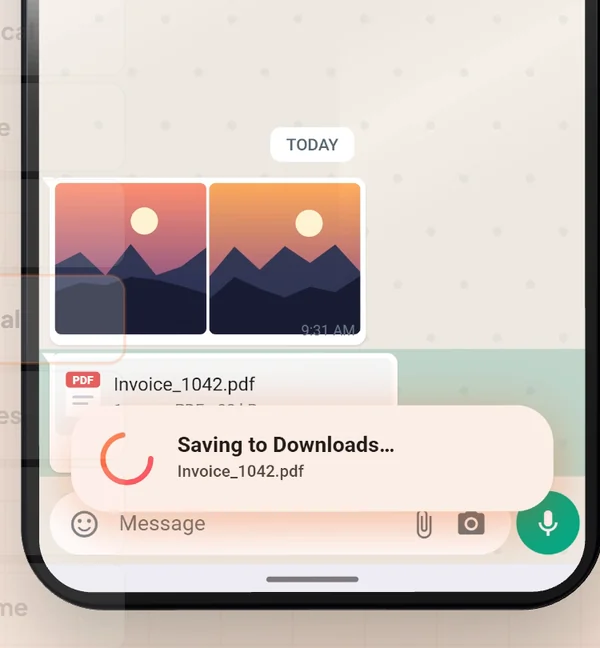
Open any file in WhatsApp, or any other app, and tap Share. In the share sheet, tap the SaveLocal icon. A card shows the file saving, and when the ring turns into a check it says Saved to Downloads. You are returned to your chat. There is no folder picker, no filename box and no sign-in. See how to save WhatsApp files.
Step 5: many files
If the app lets you select several files, pick them all first. Tap Share once and pick SaveLocal. The card counts them as it goes, such as saving four of ten, and the last message tells you how many were saved. See saving many photos at once.
Step 6: Recent Saves
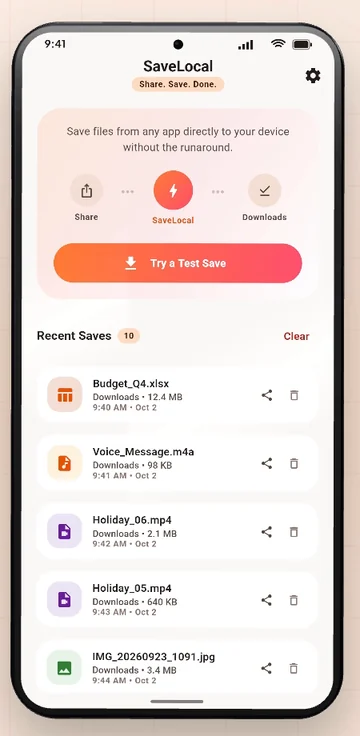
Open SaveLocal to see Recent Saves: every file you saved, with its type, name, size and time. PDFs, photos, videos and audio have their own colours. Tap a card to open the file, or use the share icon to pass it on. The bin clears the list entry, never the file. See where to find saved files.
Step 7: folder or theme
Tap the gear to open Settings. You can pick a different save folder, switch to a dark theme, and turn on prompts if you would rather be asked each time. Under About you will find a link to the website. See how to change the save folder.
The facts in one place
| Question | Answer |
|---|---|
| Where do files go? | Downloads by default, or a folder you pick |
| Are names kept? | Yes, with a number in brackets for a repeat, never overwritten |
| Which file types? | Any: photos, PDFs, videos, audio, office files, ZIPs |
| Which apps? | Any app with a Share button for a file |
| Account, ads, upload? | None of the three |
| Internet needed? | No, it works offline |
| Storage permission? | Not on Android 10 and newer |
Questions people ask
What is SaveLocal?
A free Android app that adds a Save option to the share sheet. Share a file, pick SaveLocal, and it is copied to your Downloads folder with its original name.
How do I test it?
Open the app and tap Try a Test Save. A small file lands in Downloads and shows in Recent Saves.
Does it need an account or internet?
No. It works offline, with no account and no ads.
Can it save many files at once?
Yes. Select them, share once, and the card counts them as they save.
Can I choose the save folder?
Yes, in Settings. The default is Downloads.
Is it a backup or a file manager?
No. It saves what you share to it. Keep separate backups.
Keep reading
Try it in a minute
SaveLocal is free on Google Play. Install, test, share.

For reference. Steps and screens described here are as they appear in SaveLocal, and menu names and folder paths can differ between phone makers and versions of Android and WhatsApp, so check them on your own phone. SaveLocal saves what another app shares with it, so the result depends on what that app allows. It is not a file manager and not a backup service, so keep separate copies of anything important. You are responsible for having the right to keep the files you save. WhatsApp, Telegram, Gmail, Chrome and other app names are trademarks of their owners and are used only to describe what SaveLocal works with.