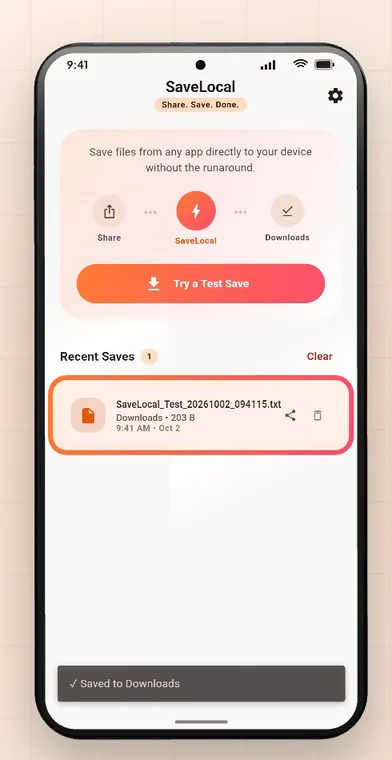
SaveLocal is a free Android app by Trishunya Infotech, built by a solo developer. It adds a missing save option to Android's share menu: open a file, tap Share, pick SaveLocal, and it lands in Downloads with its original name. One file or a batch. No account, no ads, no upload, and it works offline.
Why it exists
Files arrive in chats and get buried in folders you never open. People end up asking "can you send that again?". SaveLocal was designed for minimal taps and zero friction: Share. Save. Done. It is the Save action Android's share sheet never had. See how it fits into the share sheet.
What it does
- Saves any file another app shares with it to your Downloads folder, or a folder you pick, with its original name.
- Saves one file or a batch, with a live count, and carries on if one fails.
- Handles any type and size, copying in small pieces so big files do not strain memory.
- Never overwrites. A repeat gets a number in brackets.
- Lists what you saved in Recent Saves, with type, name, size and time.
- Has a dark theme and an optional folder or prompts in Settings.
What it does not do
- It is not a file manager. It saves what you share to it, and that is all.
- It is not a backup service. It does not scan, verify or back up your files, so keep separate copies of anything important.
- It depends on what other apps allow you to share. Some apps limit which files they let you share.
- You are responsible for having the right to keep the files you save.
What data it uses
Your files, file names and save history stay on your phone. SaveLocal counts anonymous usage, such as how many files were saved, but never names or contents, and uses Meta's SDK to measure app installs where permitted. On Android 10 and newer it needs no storage permission. The Privacy Policy and Data Safety pages on this site have the details. See whether it is private to save files offline.
How it stays free
It is built solo by Trishunya Infotech, free of ads and accounts, and designed so that you barely notice it was there. You will find the studio's website in Settings, under About.
Feedback
If something does not work, or a feature would help, the developer wants to hear it. The app tour covers every screen, and the website has the privacy policy, terms of use and data safety details.
Questions people ask
Who makes SaveLocal?
Trishunya Infotech, a solo Android app studio.
Is SaveLocal free?
Yes. It is free, with no ads and no account.
Does it upload my files?
No. It copies them on your phone and works offline.
Is it a file manager or backup?
No. It saves what you share to it. Keep separate backups.
Which apps does it work with?
Any app with a Share button for a file, such as WhatsApp, Telegram, WeChat, Gmail, Chrome, Drive and Files.
Where do I find the developer's website?
In the app, under Settings, About.
Keep reading
Try it on your phone
SaveLocal is free on Google Play. Share. Save. Done.

For reference. Steps and screens described here are as they appear in SaveLocal, and menu names and folder paths can differ between phone makers and versions of Android and WhatsApp, so check them on your own phone. SaveLocal saves what another app shares with it, so the result depends on what that app allows. It is not a file manager and not a backup service, so keep separate copies of anything important. You are responsible for having the right to keep the files you save. WhatsApp, Telegram, Gmail, Chrome and other app names are trademarks of their owners and are used only to describe what SaveLocal works with.