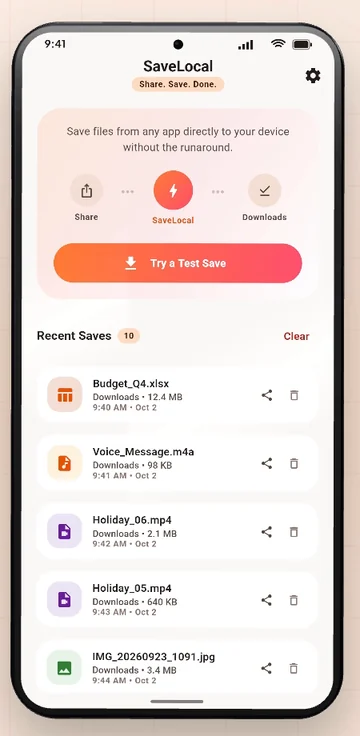
Open the Files app, the Files by Google app or your phone maker's My Files, and tap Downloads. The folder is called Download on internal storage. You can also open Recent files, search by name or type, or open Downloads from Chrome's menu. In SaveLocal, Recent Saves lists every file you saved with its type, name, size and time.
Where it is
On every Android phone, downloaded and saved files go by default to a folder on internal storage named Download. The phone shows it as Downloads in file apps. The usual path, if you ever need it, is:
Internal storage / DownloadYou will see it in the Files app, in Chrome's downloads list and in most other apps that open files.
Four ways to open it
- The Files app. Open Files (Files by Google on many phones, My Files on Samsung, or your phone maker's own) and tap Downloads.
- Recent files. Open Files and look at the Recent tab, which shows what you opened or saved lately.
- Chrome. Open the menu and tap Downloads to see what Chrome downloaded.
- The app drawer. Some phones have a Downloads app of their own in the drawer.
| Phone | App to open | Where |
|---|---|---|
| Google Pixel and most phones with stock Android | Files by Google | Browse, then Downloads |
| Samsung | My Files | Downloads under Categories, or Internal storage then Download |
| Other makers | The maker's file manager | Look for Downloads or Internal storage |
Menu names change between versions, so these are starting points.
Search and sort
- Search by name. The search bar in the Files app finds part of a name.
- Filter by type. Look for Images, Videos, Audio and Documents shortcuts.
- Sort by date. Newest first is usually the fastest way to find what you just saved.
See what you saved with SaveLocal
Open SaveLocal. Recent Saves lists every file you saved, newest first, with its type, name, size and time. PDFs, photos, videos and audio have their own colour icons. Tap a card to open the file, or tap the share icon to send it on. The bin clears the list, never the file.
If a file is missing
- Check whether you chose a custom folder in SaveLocal Settings. If so, look there. See how to change the save folder.
- If the file came from WhatsApp, it may still be in WhatsApp's own folder. See where WhatsApp files are stored.
- If it saved with a number in brackets, search for part of the name. See how copies are numbered.
- A file shown as downloading, or with a download arrow in a chat, is not on the phone yet.
Keep it tidy
Downloads gets full. Move files you want to keep into folders, delete the ones you do not need, and copy anything important to a computer or a cloud drive. A folder per client or project helps most.
Questions people ask
Where is the Downloads folder on my Android phone?
On internal storage in a folder named Download. Open it from the Files app, or from the Downloads shortcut in your file manager.
How do I see recently downloaded files?
Open the Files app and look at the Recent tab, or sort Downloads by date, newest first.
How do I see what I saved with SaveLocal?
Open the app and look at Recent Saves, which lists each file with its type, name, size and time.
Why is a downloaded file not in Downloads?
It may have gone to a custom folder, to the app's own folder, or it has not finished downloading.
Can I change where files are saved?
In SaveLocal Settings you can pick a folder. Other apps have their own settings.
Does deleting from Recent Saves delete the file?
No. It only clears the list entry.
Keep reading
Know exactly where it went
SaveLocal is free on Google Play. Recent Saves shows every file you saved.

For reference. Steps and screens described here are as they appear in SaveLocal, and menu names and folder paths can differ between phone makers and versions of Android and WhatsApp, so check them on your own phone. SaveLocal saves what another app shares with it, so the result depends on what that app allows. It is not a file manager and not a backup service, so keep separate copies of anything important. You are responsible for having the right to keep the files you save. WhatsApp, Telegram, Gmail, Chrome and other app names are trademarks of their owners and are used only to describe what SaveLocal works with.