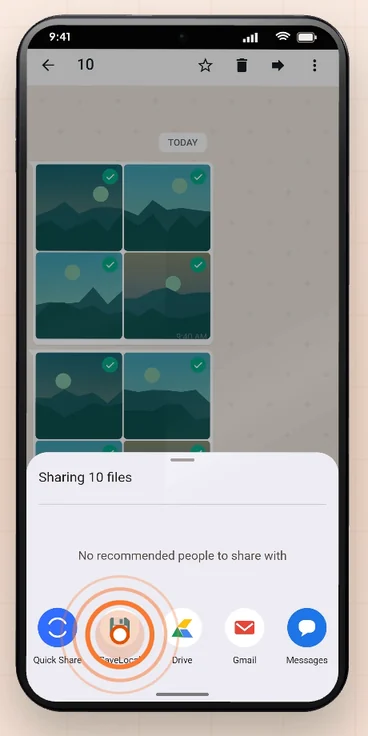
Open the file, tap Share, and pick SaveLocal. That works in WhatsApp, Telegram, WeChat, Gmail, Chrome, Drive and Files, and in any other app that has a Share button for a file. The file is copied to your Downloads folder, or to a folder you choose, with its original name.
Every app is different
Gmail has a download icon on attachments. Telegram has Save to Downloads in a file's menu. Chrome saves downloads automatically. WhatsApp has no clear save button for documents. Each app also saves to a slightly different place, with slightly different names, so your files end up scattered.
Android has one thing in common across all of them: the share sheet. If an app can send a file to another app, it can send it to SaveLocal.
One method for all
- Open the file in the app, or select several.
- Tap Share.
- Pick SaveLocal.
A card shows the progress, says Saved to Downloads, and you are returned to the app you were in.
App by app
| App | Built-in option | With SaveLocal |
|---|---|---|
| WhatsApp, WeChat | Little for documents; files stay in the app's own folders | Share, pick SaveLocal |
| Telegram | Save to Downloads in the file menu | Share, pick SaveLocal, useful for a batch |
| Gmail | Download icon on each attachment | Share the attachment, pick SaveLocal |
| Chrome | Downloads automatically when you tap a link | Share a file you opened, pick SaveLocal |
| Google Drive, Files | Download or Save to device | Share, pick SaveLocal |
| Photos | Download a copy | Share one or many, pick SaveLocal |
Menus change between versions of each app, so use the table as a guide.
When this beats the built-in save
- One habit, every app. You do not need to remember each app's own save step.
- One place. Files from every app go to the same folder, so you search one place.
- Original names. Files keep their names, including spaces, accents and other languages.
- Batches. Select many, share once, and watch them count.
- No overwriting. A repeat gets a number in brackets. See how duplicates are handled.
What it cannot do
SaveLocal saves what another app shares with it, so it depends on what that app lets you share. Some apps limit sharing for certain files. It is not a file manager and not a backup service. See what the share sheet is for how apps pass files to each other.
Questions people ask
How do I save a Gmail attachment to my phone?
Use the download icon on the attachment, or open it, tap Share and pick SaveLocal to save it to the same folder as your other files.
How do I save Telegram files to Downloads?
Telegram has Save to Downloads in a file's menu. You can also share the file and pick SaveLocal, which is handy for many files at once.
Does SaveLocal work with every app?
It works with any app that can share a file through Android's share sheet, including WhatsApp, Telegram, WeChat, Gmail, Chrome, Drive and Files.
Are the files uploaded anywhere?
No. SaveLocal copies them on your phone and never uploads them.
Where do the files go?
To Downloads by default, or a folder you pick in Settings.
Do I need to be online?
No. It works offline.
Keep reading
One share, every app
SaveLocal is free on Google Play. Works with any app that can share a file.

For reference. Steps and screens described here are as they appear in SaveLocal, and menu names and folder paths can differ between phone makers and versions of Android and WhatsApp, so check them on your own phone. SaveLocal saves what another app shares with it, so the result depends on what that app allows. It is not a file manager and not a backup service, so keep separate copies of anything important. You are responsible for having the right to keep the files you save. WhatsApp, Telegram, Gmail, Chrome and other app names are trademarks of their owners and are used only to describe what SaveLocal works with.