Type the price you were told into a converter set to your home currency, and read out the rounded result. A calculator takes about a minute because you must open it, remember the rate and multiply. With Here & Home you tap the clock on your home screen, type the price, and see it in your home currency in about three seconds. Say the rounded figure aloud, then decide.
The question that follows every price
You are in a market, a souvenir shop or a duty-free queue. The seller says a number in a currency you have never held. The person you are travelling with, a partner, a parent, a friend or a child, turns and asks: "How much is that in our money?" Then, five minutes later, they ask again for the next item.
It is a fair question. Prices only mean something in the currency you earn and spend every day. At home you know that a shirt should cost about this much and a box of tea about that much. Abroad that instinct stops working, and you need a number you can relate to.
Why the calculator is slow
The usual method has five steps, and every step gives you a chance to slip:
- Unlock the phone and open the calculator.
- Remember the exchange rate, and whether to multiply or divide.
- Type the price, taking care with the zeros.
- Do the sum and read the result.
- Repeat for the next item, and again for the one after.
With currencies that have many zeros, such as the yen, rupiah or dong, a single misplaced zero changes the answer by ten times. See currencies with many zeros. If you shop in several countries, the rate you remembered for the last one is the wrong rate for this one.
The three second answer
A converter that already knows both currencies removes the steps that cause trouble. You type the price, and the result appears at once in your home currency.
- Open the converter, from a home screen widget if you can.
- Type the price the shopkeeper told you.
- Read the home currency result, and round it for conversation.
| Price tag (yen) | In rupees | What you would say out loud |
|---|---|---|
| 1,200 | 733 | About 730 rupees |
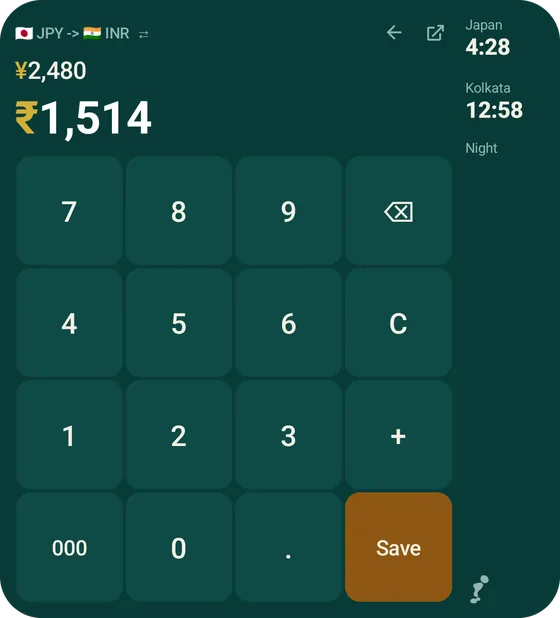
| 2,480 | 1,514 | About 1,500 rupees |
| 5,800 | 3,541 | About 3,500 rupees |
| 12,000 | 7,326 | About 7,300 rupees |
The figures are illustrative, at a rate of about 0.61 rupee to the yen. The second row matches what the app shows for 2,480 yen. Rounding is part of the trick: "about fifteen hundred" is all your companion needs to hear.
Where it comes up
- Markets and bargaining. You need the home price before you counter-offer, and fast. For more on this, see is it overpriced?
- Souvenirs. Ten small gifts add up. Save each as you buy, and you will know the total before the last shop.
- Duty free. A price in dollars or euros for a product priced in your own currency at home. See card fees and DCC explained for what you really pay.
- Restaurant menus. A whole page of prices that all need translating. Convert the two or three dishes you are actually considering.
- Taxis and tickets. Where there is no menu to read, a quick answer helps you decide if the fare is fair.
Say it so everyone can relate
- Lead with the home figure. "That is about 1,500 rupees" is more useful than "that is 2,480 yen".
- Round generously. Two significant figures are plenty while you shop.
- Name a comparison. "About what a lunch costs at home" lands better than a number alone.
- Hand over the phone. If the other person wants to check, let them type the next price.
- Remember the card. The converted figure is the shelf price. The amount that leaves your account depends on your card's fee. See the fees guide.
In Here & Home
Here & Home puts the converter on your home screen. The widget looks like a clock, and a tap on it opens the converter, so you are never more than one tap from the answer. You pick your home currency once, type the price, and see the result in your own currency. Press Save to add it to your trip, and the amounts become a record you can compare with a daily budget. Rates are indicative, show where they came from and how old they are, and are not a bank quote. The rest is in the app tour.
If you are not sure where to start, the home screen guide shows the setup in a few steps.
Questions people ask
How do I quickly convert a price to my own currency while shopping abroad?
Use a converter set to your home currency and type the price. Here & Home shows the result in about three seconds from a home screen widget.
Why is a calculator slow for this?
You must open it, remember the rate, decide whether to multiply or divide and keep track of zeros. Every extra step is a chance for a mistake.
Should I round the converted price?
Yes, when shopping. Two significant figures are enough to judge whether something is cheap or dear.
Is the converted price what I will pay?
Not exactly. Card fees and the rate your bank applies change the final amount. See the guide on card fees.
Do I need a signal to convert prices?
Here & Home can work offline using the last saved rates. See the offline converter guide.
Can I keep track of what I buy?
Yes. Save each price to your trip and see where the money went.
Keep reading
Answer the question in three seconds
Here & Home is free on Google Play. A price converter one tap from your home screen.

For reference. Steps and screens described here are as they appear in Here & Home, and menu names can differ between versions of Android and the app. Exchange rates and prices in examples are illustrative, and rates in Here & Home are indicative, updated periodically and not financial quotes. Emergency numbers, phrases, country facts and survival tips are general information given on a best-effort basis: check them before you travel, and do not rely on any app alone in a life-threatening emergency. Here & Home is a field companion, not a financial or emergency service. Trademarks are those of their owners and are used only to describe what the app works with.