Steel Table USA is a free Android reference for engineers and fabricators. Steel Mode has three tabs: Explorer (over 1,800 sections in twelve categories), Optimizer and Compare. Inspect shows a scaled sketch, dimensions, weight, cost per foot, section properties and design capacity. Bolt Mode adds RCSC joint tables and a bolt group calculator. The data is stored in the app, so it works with no signal.
Two modes: Steel and Bolt
The switch at the top of the app changes between Steel Mode and Bolt Mode. Steel Mode is for shapes and costs. Bolt Mode is for connections. The top bar also has an export button and the menu. In Steel Mode the tabs along the bottom are Explorer, Optimizer and Compare.
Explorer: twelve categories and search
The Explorer opens on twelve category cards, each with its section count: W/M/S/HP, channels, equal angles, unequal angles, tees, HSS rectangular, HSS round, pipe, bars, flats, plate and sheet. A button on the card header cycles between full cards, names only and shapes only.
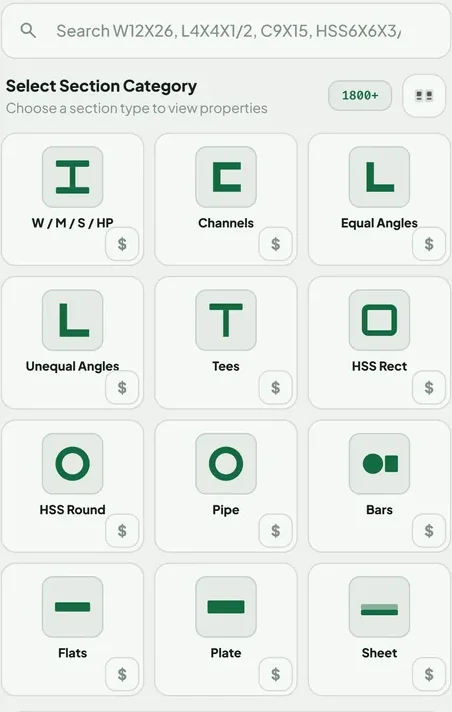
Type in the search bar to find a shape by name, for example W12x26, L4x4x1/2, C9x15 or HSS6x6x3/8, or tap a category to open the whole family. Results show as cards or as a spreadsheet-style table. The Sort control orders them by weight, depth, inertia or modulus, and the filters narrow the list. If you are new to the names, read how to read an AISC shape table.
Inspect: the full detail view
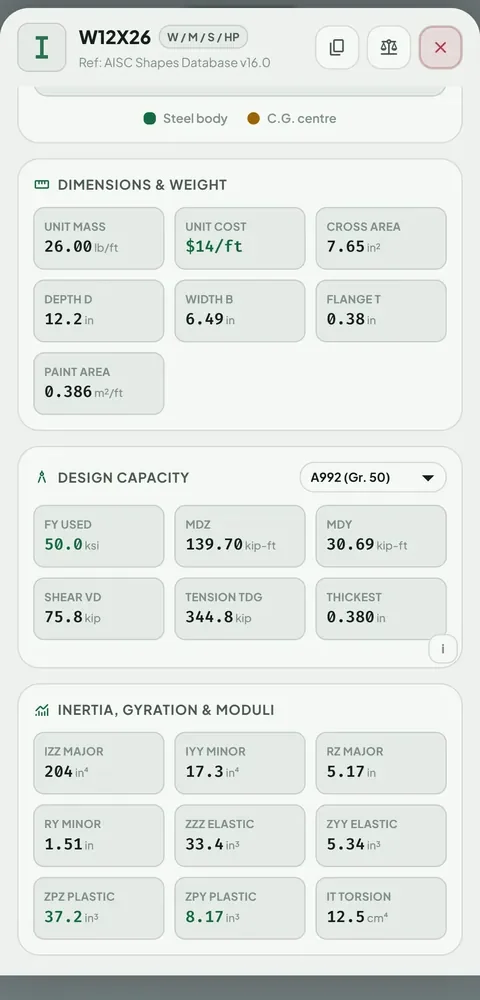
Tap Inspect on any shape. You get a scaled sketch of the profile with its axes and center of gravity, then dimensions, weight, cost per foot, moment of inertia, radius of gyration and the elastic and plastic moduli. A symbol button flips the sketch between letters (D, B, t, T) and the real measurements. Previous and next buttons, or a drag grip, step through the whole list without leaving the panel. A button adds the shape to Compare.
Design capacity
Pick a steel grade such as A36 or A992 and the Design Capacity card shows the yield strength used and the bending, shear and tension strength under AISC 360. For a W12x26 in A992 it shows about 140 kip-ft of strong-axis bending, assuming the shape is compact and fully braced. The small i button lists exactly what is assumed. See how to check a beam to AISC 360 for the hand calculation.
Your own size for bars, flats, plate and sheet
For bars, flats, plate and sheet, tap the control button and type your own dimensions. Every property and the cost recalculates for that size. The weights use a density of 7850 kg per cubic metre, which is 0.2836 lb per cubic inch. Plate and sheet show cost in dollars per square foot. The bar weight chart and plate weight chart list the same numbers.
Optimizer
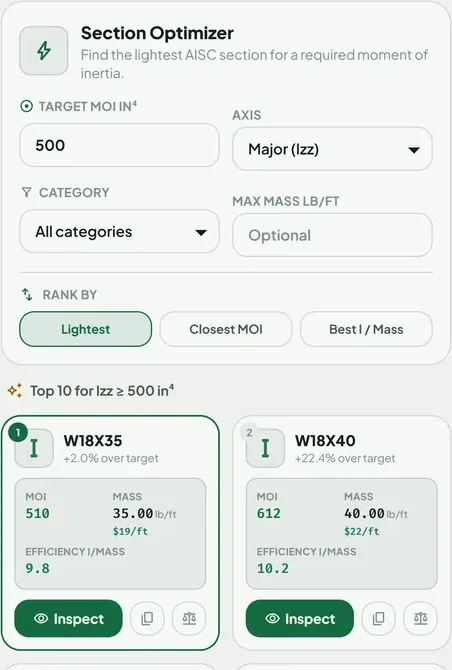
Enter the moment of inertia you need and choose the axis. The Optimizer lists the top ten shapes. You can rank by lightest, closest to your target, or best stiffness per pound, and limit the search to one category or to a maximum weight. The guide on picking the lightest section shows a worked example.
Compare
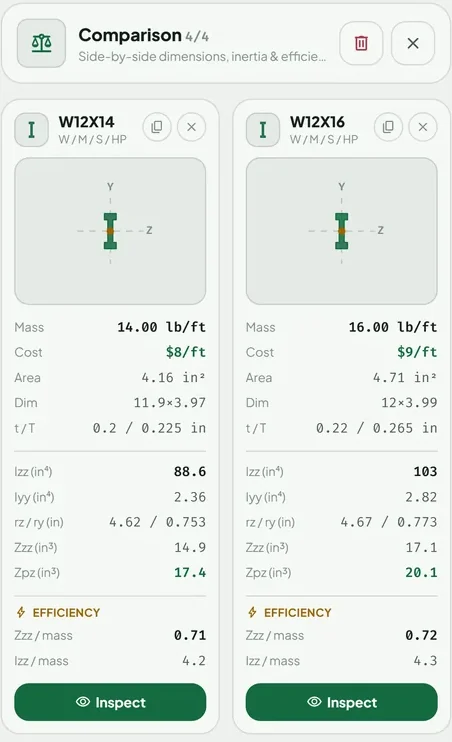
Tap the balance icon on up to four shapes, then open the Compare tab to see them side by side: sketch, dimensions, weight, cost and section properties, with a simple efficiency figure under each.
Menu: price, units, display, export
Open the menu to set your steel price per pound. Costs per foot update across the whole app. If a supplier charges differently for one category, give that category its own price with its dollar button. The starting price is only an example, so enter your own. The menu also switches units between inch-pound and metric, switches dark mode, turns on large text, and has a link to write to the developer.
The download button in the top bar exports any list to CSV, JSON or Markdown for a spreadsheet or a report.
Bolt Mode
Bolt Mode holds tables from the RCSC Specification for hole sizes, minimum pretension, turn-of-nut rotation and slip resistance, plus a calculator for bolt group capacity. The calculator checks bolt shear, tension and slip-critical capacity, with an optional bearing and tearout check on the connected plate. Two guides cover it: the hole size and pretension chart and the bolt group capacity guide.
Where to get it
Steel Table USA is free on Google Play. There is no account to create. The steel data is stored in the app, so a weak or missing signal does not slow it down. Ads keep it free, and watching one short video gives you a day without ads. It is a planning and reference tool, so confirm important values with your engineer.
Questions people ask
What is Steel Table USA?
A free Android app that holds the AISC Shapes Database, RCSC bolt tables, a design capacity calculator, an optimizer, a compare tool and a cost estimator. It is made by Trishunya Infotech.
How many steel sections are in the app?
Over 1,800, in twelve categories: W/M/S/HP, channels, equal angles, unequal angles, tees, HSS rectangular, HSS round, pipe, bars, flats, plate and sheet. Bars, flats, plate and sheet take your own size.
Does Steel Table USA work offline?
Yes. The steel data is stored in the app, so it works with no signal.
Which AISC data does the app use?
Rolled shapes come from the AISC Shapes Database version 16.0, with both inch and metric values from AISC's own columns.
Can I set my own steel price?
Yes. Type a price per pound in the menu and every cost per foot updates. Each category can also have its own price with the dollar button on its card.
Can I export a list of shapes?
Yes. The download button in the top bar exports any list to CSV, JSON or Markdown.
Keep reading
Take the tour on your phone
Steel Table USA is free on Google Play. No account, no signal needed.

For reference, not for sign-off. Shape and bolt values quoted here are as shown in Steel Table USA, which takes rolled shape data from the AISC Shapes Database v16.0 and bolt tables from the RCSC Specification (2020), and the worked examples follow AISC 360 methods under the simplifying assumptions stated in the text. Transcription can contain errors. Check critical values against the AISC Steel Construction Manual and the RCSC Specification, and have designs checked by a licensed engineer. The AISC Specification, Manual and Shapes Database are published by the American Institute of Steel Construction, and the RCSC Specification by the Research Council on Structural Connections. Steel Table USA is an independent app and is not affiliated with or endorsed by either organization.